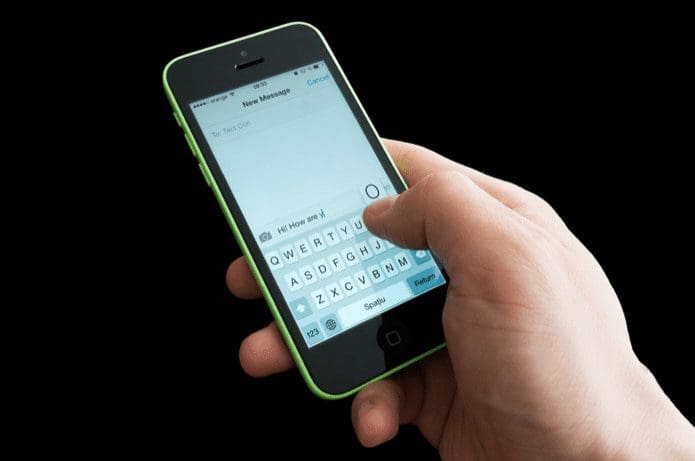
 While taking photographs, we toggle the camera orientation between portrait and landscape to get the best scene. In modern-day digital cameras, these images auto-rotate themselves when you preview them on the camera. However, when you transfer these photographs to the computer and view them, all the photographs shot in landscape mode appear out of the line.
Furthermore, if you need to upload these pictures to an online photo sharing service, you will have to rotate them to their correct orientation so that viewers view them the way they are supposed to be viewed. Doing this task manually is usually time consuming and boring.
Today I will tell you about a highly useful app called JPEG-EXIF autorotate that can automatically rotate all your photos in the camera. When a digital camera takes a photo and saves it, an EXIF orientation metadata is saved in each photo. This tool reads that data and then rotates the photo accordingly.

To use the tool install it on your system first. Now right-click the folder that contains all your photos and select the option Autorotate all JPEGs in the folder (and in all sub-folders if it contains nested albums).
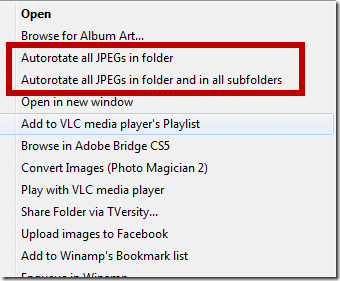
The tool will open up the command prompt, read the EXIF data of all the photographs and rotate the ones that have the wrong orientation.

Note: The tool will work only on un-processed raw images from the camera.
The application processes hundreds of photo within a few seconds and is by far the best way to batch rotate multiple photos correctly. Do try out the tool the next time you are uploading your photos on the internet and share your experience.
Was this helpful?
Last updated on 03 February, 2022
Read Next
 Top 8 Ways to Fix Auto Rotate Not Working on iPhone
Being able to rotate your iPhone's screen brings a lot of convenience to the table.
Top 8 Ways to Fix Auto Rotate Not Working on iPhone
Being able to rotate your iPhone's screen brings a lot of convenience to the table.
 10 Ways to Fix Auto Rotate Not Working on Android
Auto-rotate is one of those basic features on your phone that you probably use every day, often without even realizing it.
10 Ways to Fix Auto Rotate Not Working on Android
Auto-rotate is one of those basic features on your phone that you probably use every day, often without even realizing it.
 Set Default Orientation of Apps on Android With Smart Rotator
Auto rotate is a feature of Android that toggles your screen state between portrait and landscape depending upon your device orientation using the accelerometer sensor.
Set Default Orientation of Apps on Android With Smart Rotator
Auto rotate is a feature of Android that toggles your screen state between portrait and landscape depending upon your device orientation using the accelerometer sensor.
 Using Apple Watch in Reverse Crown Orientation: Pros and Cons
I’ve had my Apple Watch for a little under a week now.
Using Apple Watch in Reverse Crown Orientation: Pros and Cons
I’ve had my Apple Watch for a little under a week now.
 How to Change the Page Orientation in Microsoft Word
When you launch the Microsoft Word app, the page appears in portrait mode by default.
How to Change the Page Orientation in Microsoft Word
When you launch the Microsoft Word app, the page appears in portrait mode by default.
 Lost Your Digital Camera? Stolen Camera Finder Might Help You Find It
Quite a few photography blogs around the web have been mentioning a web app that promises to find your stolen (or lost) camera from a photograph.
Lost Your Digital Camera? Stolen Camera Finder Might Help You Find It
Quite a few photography blogs around the web have been mentioning a web app that promises to find your stolen (or lost) camera from a photograph.
 ActionDash vs Digital Wellbeing: Which Is the Best Option for Digital Health Tracking
Google introduced Digital Wellbeing with Android Pie to help users make healthy lifestyle choices.
ActionDash vs Digital Wellbeing: Which Is the Best Option for Digital Health Tracking
Google introduced Digital Wellbeing with Android Pie to help users make healthy lifestyle choices.
 Bacon Camera vs Camera FV-5 Lite: Which manual camera app is better
In an era where most phones don’t include manual settings in stock camera apps, you have to rely on manual camera apps to capture photos the way you want.There are
Bacon Camera vs Camera FV-5 Lite: Which manual camera app is better
In an era where most phones don’t include manual settings in stock camera apps, you have to rely on manual camera apps to capture photos the way you want.There are
The article above may contain affiliate links which help support Guiding Tech. The content remains unbiased and authentic and will never affect our editorial integrity.