While the iPhone 3G is not supported anymore by the latest releases of iOS, it’s latest operating system iOS 4 missed one of the simplest, most requested features its owners were claiming for: The ability to display Battery Percentage.
Thankfully, if you happen to have a jailbroken iPhone 3G, enabling battery percentage is a very easy process and all you will need to do is to follow these steps.
Note: Don’t forget your iPhone 3G has to be jailbroken in order for this process to work.
Step 1: Open Cydia on your iPhone and install iFile. Once you do, open it and navigate to the root[/] directory.
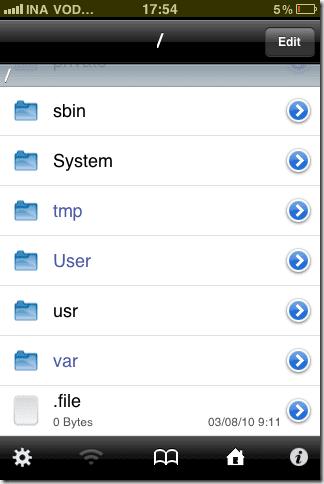
Step 2: Find the file N82AP.plist by navigating to /System/Library/CoreServices/SpringBoard.app. You will need to edit this file.
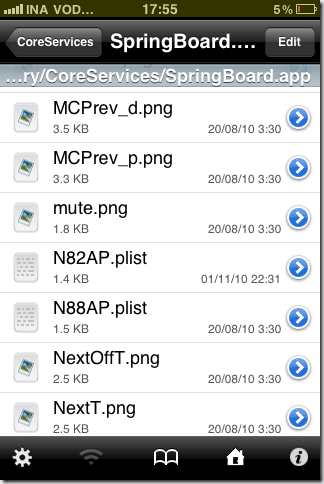
Step 3: To edit the N82AP.plist file, open it, tap on Edit and add the following code as seen on the screenshot below.

Step 4: Once you have added the code, tap on Done and Save the file.
Step 5: Once the file has been saved, close iFile and restart your iPhone 3G
That’s it! Once your iPhone 3G restarts you will see the battery percentage next to the battery icon.
Did it worked for you? Let us know in the comments.
Was this helpful?
Last updated on 03 February, 2022
Read Next
 Top 10 Tech Magazines to Subscribe to on iPad – Guiding Tech
When iPad came along, every publication rushed to provide their magazine on the iPad.
Guiding Media (Guiding Tech) is Hiring
Guiding Media, the parent company of Guiding Tech, is a new age digital media startup from India that wants to become one of the best known lifestyle media companies catering
Top 10 Tech Magazines to Subscribe to on iPad – Guiding Tech
When iPad came along, every publication rushed to provide their magazine on the iPad.
Guiding Media (Guiding Tech) is Hiring
Guiding Media, the parent company of Guiding Tech, is a new age digital media startup from India that wants to become one of the best known lifestyle media companies catering
 3 Tips To Save Battery Life on iOS 7 – Guiding Tech
As you surely know, iOS 7 is the latest and shiniest iOS operating system for Apple’s mobile devices yet.
3 Tips To Save Battery Life on iOS 7 – Guiding Tech
As you surely know, iOS 7 is the latest and shiniest iOS operating system for Apple’s mobile devices yet.
 9 Useful Ways to Preserve Battery in Android – Guiding Tech
You all are probably aware of Uncle Ben’s famous quote, “With great power, comes great responsibility” but if I were to twist and bend the saying for the modern day
9 Useful Ways to Preserve Battery in Android – Guiding Tech
You all are probably aware of Uncle Ben’s famous quote, “With great power, comes great responsibility” but if I were to twist and bend the saying for the modern day
 Enable/Disable Tabs Taskbar Preview for IE, Firefox – Guiding Tech
Tabbed browsing is one of the best features that almost all browsers have adapted today.
Enable/Disable Tabs Taskbar Preview for IE, Firefox – Guiding Tech
Tabbed browsing is one of the best features that almost all browsers have adapted today.
 Enable Touch Optimized Interface in Office 2013 – Guiding Tech
People with bigger fingers usually find it difficult to work on touch enabled devices, be it smartphones or tablets.
Enable Touch Optimized Interface in Office 2013 – Guiding Tech
People with bigger fingers usually find it difficult to work on touch enabled devices, be it smartphones or tablets.
 How To Enable Remote Desktop or RDP in VMware – Guiding Tech
There are multiple methods of connecting to a virtual machine in VMware.
How To Enable Remote Desktop or RDP in VMware – Guiding Tech
There are multiple methods of connecting to a virtual machine in VMware.
 How to Enable Automatic Login on Mac – Guiding Tech
You went into System Preferences on your Mac because you wanted to edit Automatic Login settings.
How to Enable Automatic Login on Mac – Guiding Tech
You went into System Preferences on your Mac because you wanted to edit Automatic Login settings.
The article above may contain affiliate links which help support Guiding Tech. The content remains unbiased and authentic and will never affect our editorial integrity.