
Chromebooks are particularly nifty and versatile devices. You get a fabulous computer without spending a ton. However, to bring the costs down, many manufacturers cheap out on the touchpad. Even if your Chromebook has a serviceable touchpad, you can always enhance your productivity by investing in a high-quality wireless mouse. But with so many options, you might be wondering about the best wireless mice for Chromebooks.

That’s what this article is all about. In this post, we will take a look at some of the best wireless mice for Chromebooks. We will highlight the pros and cons of each mouse, as well as its unique features. At the end of it all, you’ll be able to make your computing experience even better by opting for one of the mice on the list.
But first, you might want to check out the following:
- Are you a student? Check out these affordable Chromebooks for students.
- Got a bit more money? Here are the Chromebooks you can buy for under $500.
- Check out these USB-C hubs to boost your Chromebook’s connectivity options.
1. TECKNET Wireless Mouse
- Connectivity: 2.4GHz Wireless USB Dongle
- Battery Type: 2 x AAA batteries

The TECKNET Wireless Mouse is designed for comfort and precision. Its ergonomic shape fits comfortably in the hand, reducing strain during extended use. The cherry on top is that it’s quite budget-friendly too.
Available in a total of 11 different colorways, the TECKNET wireless mouse is easily one of the most affordable yet ergonomic mice to use with your Chromebook. The mouse has a contoured shape to fit your hand, and it has a soft, rubber coating that provides a comfortable grip.
In terms of tracking, the mouse boasts a 2,600 DPI sensor. You can easily adjust the DPI using the buttons on the mouse. As for connectivity, the device can be interfaced to your Chromebook via a 2.4GHz connection. The concoction works well, and as such, the mouse should offer a dependable connection without dropouts or delays.
What We Like
What We Don’t Like
2. seenda Rechargeable Wireless Mouse
- Connectivity: 2.4GHz Wireless USB Dongle
- Battery Type: Rechargeable

Designed primarily for kids, the seenda Rechargeable Wireless Mouse is compact yet functional. Its built-in rechargeable battery eliminates the need to constantly hunt for battery replacements too.
The seenda wireless mouse is an LED light-up mouse, with a total of 15 different LED lights. While you can’t control the RGB effect, the device ships with cool lighting patterns. You can switch the lights by pressing the button underneath the mouse. Speaking of switching, you can also choose from three different DPI presets, namely 800, 1,200, and 1,600.
Unlike most of the mice on this list, seenda’s offering doesn’t require any additional batteries. Instead, it packs in a 650mAh rechargeable battery of its own. However, the battery life is around 7-10 days with the lights on, so you’d have to juice it up frequently. For charging, the device ships with a USB-C connector at the head.
What We Like
What We Don’t Like
3. Logitech M330 Silent Plus
- Connectivity: 2.4GHz Wireless USB Dongle
- Battery Type: 1 x AA

Logitech is renowned for its high-quality peripherals, and the Logitech M330 SILENT PLUS is no exception. As the name suggests, this mouse operates silently, perfect for shared workspaces or late-night browsing sessions
First of all, the mouse has a comfortable and ergonomic design that fits your hand nicely. It’s symmetrical, so both left-handed and right-handed users can use it comfortably. Plus, it’s compact and lightweight, making it easy to carry around if need be. The M330 Silent Plus also has a long battery life. To wit, you can get up to 24 months of use on a single set of batteries.
The standout feature of the M330 Silent Plus is its quiet buttons. The left and right buttons, as well as the scroll wheel, are engineered to produce minimal noise when clicked or scrolled, making it perfect for people working in shared spaces or libraries, where noise can be distracting.
Alternatively though, if the two-year battery backup isn’t enough for you, you can check out the Logitech M705 Marathon wireless mouse. The M705 offers a whopping three-year battery life, along with a hyper-fast scroll wheel, for a bit more money.
What We Like
What We Don’t Like
4. Logitech Pebble
- Connectivity: Bluetooth + 2.4GHz Wireless USB Dongle
- Battery Type: 1 x AA

While the TECKNET mouse has a very ergonomic design, a lot of folks prefer a flat mouse for its simplicity and improved portability. If you fall under that bracket, then the Logitech Pebble might be the perfect fit for you.
The Logitech Pebble is a great option for those who are looking for a small and portable mouse. The mouse is only 2.4 inches long, so it can easily fit in your pocket or bag. The mouse also has a 1,000 DPI optical sensor, which provides smooth and accurate tracking.
The Pebble also comes touts dual connectivity, so you can seamlessly link the device via Bluetooth or use the included USB receiver for a more dependable connection. We quite like that the mouse comes with Bluetooth chops. You see, most Chromebooks offer a lackluster port selection. As such, you don’t have to invest in a dongle or take up useful connectors to accommodate the Logitech Pebble. To sweeten the deal, the Pebble mouse is also available in a handful of colors, so you can pick one that complements your Chromebook.
What We Like
What We Don’t Like
5. Anker Wireless Vertical Ergonomic Optical Mouse
- Connectivity: 2.4GHz Wireless USB Dongle
- Battery Type: 2 x AAA

The Anker 2.4G Wireless is a great option for those who are looking for a vertical ergonomic mouse. The mouse is designed to reduce wrist pain by promoting a more natural hand position.
Users opting for the Anker Vertical Ergonomic Optical mouse will have to grip it in a handshake-esque position, which helps reduce wrist pronation and forearm twisting. Correspondingly, the mouse can alleviate strain on the wrist and arm muscles during long hours of computer use. Thanks to the more relaxed grip and reduced tension, the mouse can help you prevent or minimize repetitive strain injuries (RSIs).
The mouse also comes with an optical sensor and offers adjustable DPIs between 800, 1,200, and 1,600. Consequently, you can customize the mouse’s sensitivity to your liking. Additionally, the mouse has two side buttons for extra functions. Just remember that these side buttons can’t be customized by the user.
What We Like
What We Don’t Like
6. Razer Orochi V2
- Connectivity: Bluetooth + 2.4GHz Wireless USB Dongle
- Battery Type: 2 x AA
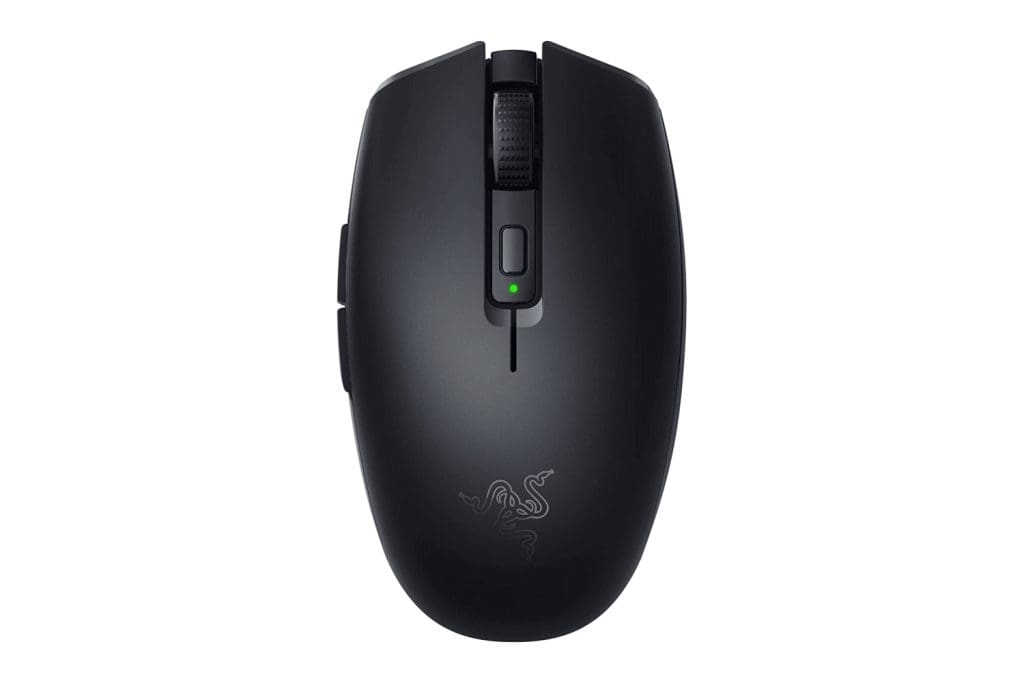
With the introduction of streaming services, you can even play high-end games on your Chromebook. But you need a good gaming mouse for the best experience. Enter – the Razer Orochi V2.
Razer dubs the Orochi V2 as the best mobile wireless gaming mouse, and it’s hard to argue with the brand’s claims. The Razer Orochi V2 is a top-notch wireless gaming mouse that doubles as an excellent companion for your Chromebook. The mouse can be connected via Bluetooth or a 2.4GHz USB dongle.
It is also quite lightweight and tips the scales at less than 60g. Add to that, the mouse has an 18,000 DPI optical sensor. Factoring everything in, the mouse offers smooth and accurate tracking. The mouse also has a number of extra buttons that can be programmed to your liking. And, with a rated battery life of 950 hours, you wouldn’t have to look for replacement AA cells all that often.
What We Like
What We Don’t Like
7. Logitech MX Master 3S
- Connectivity: Bluetooth + 2.4GHz Wireless USB Dongle
- Battery Type: Rechargeable

The Logitech MX Master 3S is one of the best mice for Chromebook, thanks to its complete feature set. It offers advanced features, high precision, and outstanding comfort. Be prepared to spend a bit of money on this, though.
The MX Master 3S is a well-built mouse that feels solid and sturdy when you hold it. It’s a bit heavier, which gives it a luxurious and high-quality in-hand feel. The best part is that it’s perfect for people with larger hands, which is quite rare among wireless mice. The mouse has a gentle curve that fits your hand’s natural shape and even has a thumb rest for extra support, making it really comfortable to use over extended periods.
The MX Master 3S has a hyper-fast scroll wheel that allows you to scroll through long documents or web pages quickly. Additionally, the mouse comes with a side scroll wheel along with programmable buttons that can be customized to invoke special functions or shortcuts. That’s not all, as the mouse supports gesture controls too.
What We Like
What We Don’t Like
FAQs on Wireless Mouse for Chromebook
Battery life varies between models. Some mice boast a battery life of up to two years, while others, like the rechargeable ones, may last a few weeks on a single charge.
Yes, in most cases, the wireless mice prefaced above should be compatible with other devices, such as laptops, desktops, and tablets, as long as they support USB or Bluetooth connections.
Using a wireless mouse with a Chromebook provides enhanced mobility and convenience, as there are no cables to restrict movement. Their ergonomic design options offer better comfort and reduced strain during prolonged use. Additionally, wireless mice often come with long battery life and noise reduction features, making them ideal for various work environments.
Boost Your Productivity with a Mouse for Your Chromebook
Choosing the right wireless mouse for your Chromebook can significantly impact your productivity and overall computing experience. Whether you prioritize ergonomic design, quiet operation, gaming features, or portability, our list of the best wireless mice for Chromebook should suffice for most users’ needs. Do let us know which mouse caught your eye in the comments below.
Was this helpful?
Last updated on 07 August, 2023
Read Next
 Top 3 Touch Mouse Alternatives to Apple’s Magic Mouse
The Magic Mouse is useful for plenty of people, but some can get annoyed by its poor ergonomics.
Top 3 Touch Mouse Alternatives to Apple’s Magic Mouse
The Magic Mouse is useful for plenty of people, but some can get annoyed by its poor ergonomics.
 6 Best Gaming Mouse for FPS Games in 2023
One of the best ways to elevate your PC gaming experience is to switch to a proper gaming mouse.
6 Best Gaming Mouse for FPS Games in 2023
One of the best ways to elevate your PC gaming experience is to switch to a proper gaming mouse.
 7 Best Lightweight Gaming Mouse You Can Buy in 2023
When it comes to gaming, the weight of the mouse plays a crucial role these days.
7 Best Lightweight Gaming Mouse You Can Buy in 2023
When it comes to gaming, the weight of the mouse plays a crucial role these days.
 6 Best Mouse Bungee for Gaming in 2023
If you own a wired gaming mouse, you must obviously know that the wired cable is a significant pain point.
6 Best Mouse Bungee for Gaming in 2023
If you own a wired gaming mouse, you must obviously know that the wired cable is a significant pain point.
 6 Best Ergonomic Gaming Mouse You Should Buy in 2023
Ergonomic gaming mice help reduce fatigue and pain during extended gaming sessions.
6 Best Ergonomic Gaming Mouse You Should Buy in 2023
Ergonomic gaming mice help reduce fatigue and pain during extended gaming sessions.
 7 Best MMO Gaming Mouse: Wired and Wireless
MMO games or Massively Multiplayer Online games typically involve a lot of inputs and macros.
7 Best MMO Gaming Mouse: Wired and Wireless
MMO games or Massively Multiplayer Online games typically involve a lot of inputs and macros.
 6 Best Wireless Mouse for Macs That You Can Buy
One of the most sought-after features of a MacBook is its trackpad.
6 Best Wireless Mouse for Macs That You Can Buy
One of the most sought-after features of a MacBook is its trackpad.
 7 Best Mouse With Programmable Buttons: Wired and Wireless
A mouse with programmable buttons can significantly enhance your gaming and productivity experience.
7 Best Mouse With Programmable Buttons: Wired and Wireless
A mouse with programmable buttons can significantly enhance your gaming and productivity experience.
The article above may contain affiliate links which help support Guiding Tech. The content remains unbiased and authentic and will never affect our editorial integrity.