

Valve’s Steam Deck is one of the most sought-after portable consoles among gamers. It packs quite a lot of power for its size and the fact that you can play several AAA titles on the move makes it a compelling device. If you already own a Steam Deck or are planning to get one, you might also want to consider getting a few Steam Deck accessories.

Accessories improve the experience of using just about every single device. So, whether you want a better grip when playing on your Steam Deck or want to hook it up to a large-screen TV, here are some of the best Steam Deck accessories that you can buy to improve your gaming experience.
Before we get to the products, though, here are some other articles that may interest you:
- Take a look at some of the best budget gaming TVs if you wish to connect your Steam Desk to a large screen.
- Along with good visuals, add a nice thump to your gaming experience with these Dolby Atmos soundbars.
Let’s get to the Steam Deck accessories now.
1. Mizzkly Steam Deck Case with Tempered Glass

Mizzkly has made one of the best Steam Deck accessories to protect your gaming console. The case protects the chassis of the Steam Deck as well as the display since you also get a screen protector bundled in the package. It is a TPU case that covers the entire console which serves two purposes — it protects the Steam Deck and adds more grip to it making it easier to handle.
All the reviews for this product are excellent since it offers fantastic value for your money. It is pretty much the only product you need to buy for comprehensive protection of your Steam Deck. The design of the case is such that it has vents to dissipate heat better so it doesn’t hinder the gaming performance.
2. Arteck Wireless Backlit Keyboard with Mouse
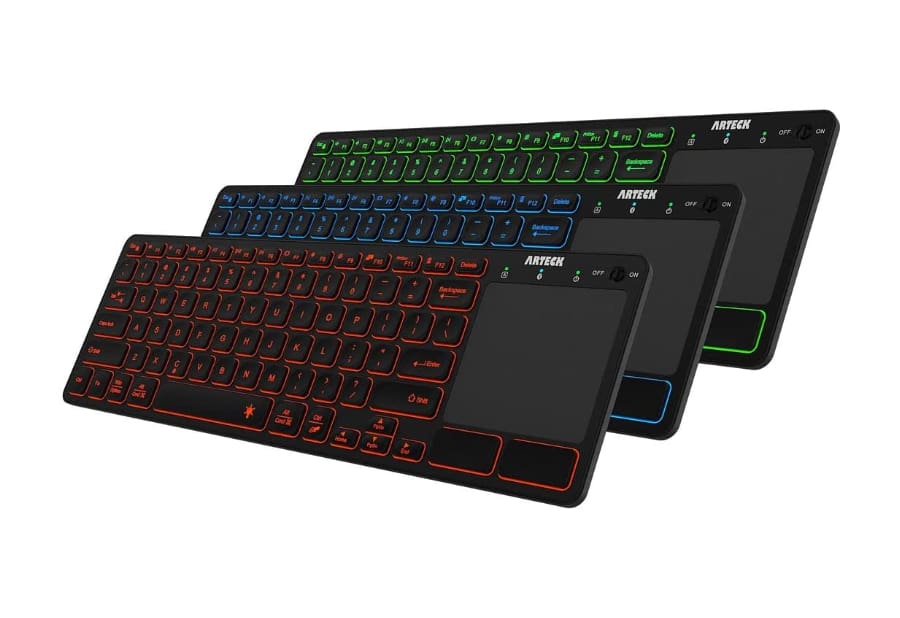
The Arteck wireless keyboard and trackpad work via Bluetooth which means you don’t need any USB dongle or receiver to be plugged into the Steam Deck. Thanks to this, you can also pair and use it with multiple devices like your TV, computer, or even smartphone to type when you’re not using your Steam Deck.
As per the reviews, the key travel on this keyboard is quite low which can be a con for some users. Another downside is that the battery life is quite poor with the backlight enabled. Also, some devices don’t recognize the tap-to-click functionality so you will have to use the physical buttons. Overall, this is one of the best mouse for the Steam Deck along with a keyboard.
3. Belkin Ultra HD HDMI 2.1 Cable

An HDMI cable is a simple accessory. However, there are various types of HDMI cables for different purposes. If you have a gaming console, an HDMI 2.1 high-speed cable is generally recommended. The Belkin Ultra HD cable supports Dolby Vision playback and streaming up to a whopping 8K, making it compatible with pretty much any device.
Even if you wish to place your Steam Deck far from your TV, this cable is 6.6ft long which should compensate for the distance. Since it supports HDR10, you can use the same HDMI cable with other gaming consoles or streaming devices too. It’s expensive, but it’s a one-time investment that will give you excellent video quality.
4. JSAUX 6-in-1 Docking Station
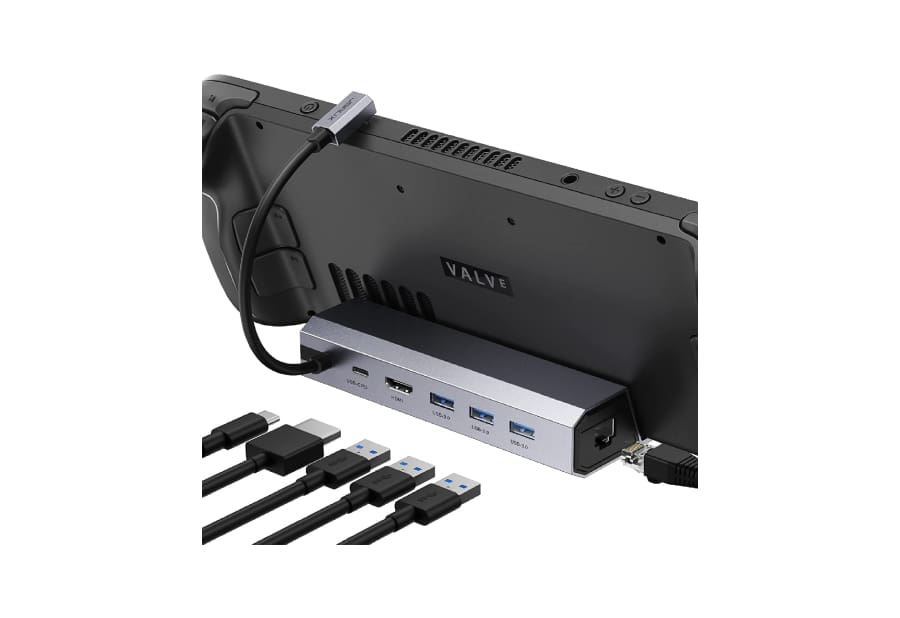
Given that the Steam Deck is a small and portable handheld console, there’s not a lot of space in there for multiple ports. This is exactly why you may need a docking station like this one to attach devices like SSDs, displays, or even a LAN cable to your Steam Deck for faster and stable internet connectivity.
This dock attaches via the USB-C port but that doesn’t mean you’re losing out on one port’s connectivity. The dock has a USB-C port too which you can use to connect an SSD or any other external device of your choice. Then, you get an HDMI port to connect to an external display like a TV. The 3 other ports are USB-A 3.0 ports that can be used to attach peripherals. This is one of the must-have Steam Deck accessories for sure.
5. SanDisk 512GB UHS-I microSD Card

This microSD card from SanDisk gives you a whopping 512GB of additional storage which should be plenty for all your files. The best part is that the read and write speeds are fast so you shouldn’t have any issues accessing files stored on the card via your Steam Deck.
If you still haven’t purchased the Steam Deck console and are contemplating between the storage variants, we suggest getting the lower storage version. This way, you can save some cash and upgrade the storage via this microSD card for your Steam Deck. It works out much cheaper.
6. Baseus 65W 20000mAh Power Bank

Baseus is giving you 4 ports with this power bank — 2 USB-C and 2 USB-A ports. One USB-C port can be used for both input and output while the other one is solely for output. The maximum power from the USB-C ports is 65W which should be sufficient to charge your Steam Deck at a good pace.
The USB-A ports can be used to charge smaller devices like your smartphone or other accessories. Despite having a large capacity, the power bank isn’t extremely bulky and can fit into your backpack with ease. There is a tiny display on the front that reads out the remaining battery in the power bank. Overall, this is a great purchase if you game when traveling.
FAQs for Steam Deck Accessories
It’s recommended to use a UHS-I microSD card on the Steam Deck with at least a V10 configuration for the best results.
If you already have an existing keyboard and mouse but they’re wired, you can still use them with your Steam Deck by getting a USB-C to USB-A dongle or the dock mentioned above.
Keep the Steam Engine Running
Get the most out of your Steam Deck with these accessories to help you further improve your gaming experience on the device. Depending on your usage, either get one or all of these best Steam Deck accessories for yourself. Happy gaming!
Was this helpful?
Last updated on 02 January, 2023
Read Next
 6 Best Meta Quest 2 Accessories: Improve Your Oculus VR Experience
The Meta Quest 2 is arguably one of the best mainstream VR headsets in the market.
6 Best Meta Quest 2 Accessories: Improve Your Oculus VR Experience
The Meta Quest 2 is arguably one of the best mainstream VR headsets in the market.
 Learn iOS Game Center Basics to Improve Gaming Experience
In the past few years, few things have truly exploded as much on the iPhone and other smartphones as gaming has.
Learn iOS Game Center Basics to Improve Gaming Experience
In the past few years, few things have truly exploded as much on the iPhone and other smartphones as gaming has.
 5 Best Power Banks for Steam Deck to Prolong Your Gaming Sessions
The Steam Deck's popularity has skyrocketed in a short time.
5 Best Power Banks for Steam Deck to Prolong Your Gaming Sessions
The Steam Deck's popularity has skyrocketed in a short time.
 7 Best Solar Outdoor Lights for Deck and Deck Railing
Over the years, solar lights have grown in popularity.
7 Best Solar Outdoor Lights for Deck and Deck Railing
Over the years, solar lights have grown in popularity.
 7 Killer Tools To Improve Your Windows 8 Experience
It seems that all the hype and hoopla around Windows 8 has finally started to subside, and while Microsoft has sold a ton of licenses (no surprise there), the new
7 Killer Tools To Improve Your Windows 8 Experience
It seems that all the hype and hoopla around Windows 8 has finally started to subside, and while Microsoft has sold a ton of licenses (no surprise there), the new
 How to Use TweetDeck to Improve Your Twitter Experience
There was a time when I didn’t know about scheduled tweets, keyword tracking on Twitter (useful for market research or just to learn more about topics), and tweeting on a
How to Use TweetDeck to Improve Your Twitter Experience
There was a time when I didn’t know about scheduled tweets, keyword tracking on Twitter (useful for market research or just to learn more about topics), and tweeting on a
 5 Best Steam Deck Docks in 2023
Valve’s Steam Deck is shaping up to be a terrific handheld console.
5 Best Steam Deck Docks in 2023
Valve’s Steam Deck is shaping up to be a terrific handheld console.
 6 Best Keyboards for Steam Deck Under $100: Wired and Wireless
The Steam Deck is a fantastic handled gaming console.
6 Best Keyboards for Steam Deck Under $100: Wired and Wireless
The Steam Deck is a fantastic handled gaming console.
The article above may contain affiliate links which help support Guiding Tech. The content remains unbiased and authentic and will never affect our editorial integrity.

