
Reddit is a goldmine of information and is one of the more unique platforms on the internet. A part of the reason is how information is presented in a post. There are tables, code blocks, polls, lists, etc., that lets the user add a lot of detail to a post. Ever wondered how you could recreate some of these elements in your post? Here’s how you can use text formatting on Reddit in Markdown mode.

Reddit has two formatting modes while you are adding content to a post – the Fancy Pants mode and the Markdown mode. The former is a simple, easy-to-use formatting tool, but it has limited features. However, Markdown mode lets you customize your text in numerous ways, and we’ll show you everything you need to know.
What Is Markdown Mode on Reddit
Markdown mode is a syntax-based text formatting tool available on the web version of Reddit. It lets you use a variety of text formats and improve the structure of your content.
You can add different headings, inline code, and links, classify text as a spoiler, add tables, lists, code blocks, and more. Here’s how you can access Markdown mode on Reddit. Once you click on the option to create a new post, click on the Markdown mode button to get started.

In the article’s next section, we’ll show you all the different ways to format text. Let’s begin with some basic text formatting options.
How to Format Text on Reddit: Basic Text Formatting in Markdown Mode
We’ll show you how to add emphasis to your text, add a strikethrough, superscript, line breaks, headers, and more basic text formatting options on Reddit. Let’s begin.
1. Emphasis
Italics: To add italics text, you need to place the characters between an asterisk (*) at either end.
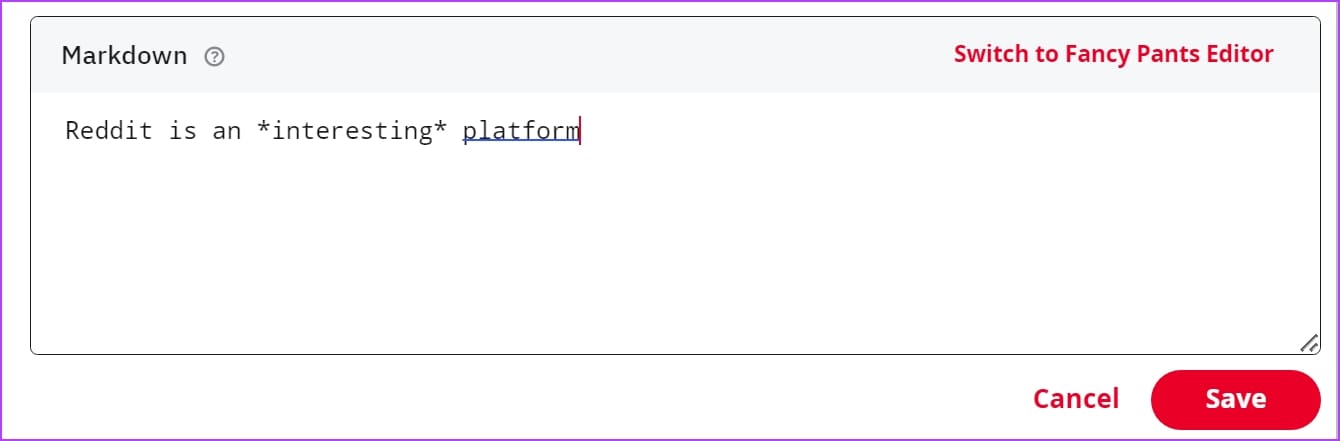
Here’s how the text looks after adding the bold syntax for the word ‘interesting’.

Bold: To add bold text, place the characters between two asterisk marks (**) at either end.

Here’s what the text looks like after adding the bold syntax for the word ‘interesting’.

Bold & Italics: If you want the content to be displayed in both bold and italics, here’s what the syntax looks like.
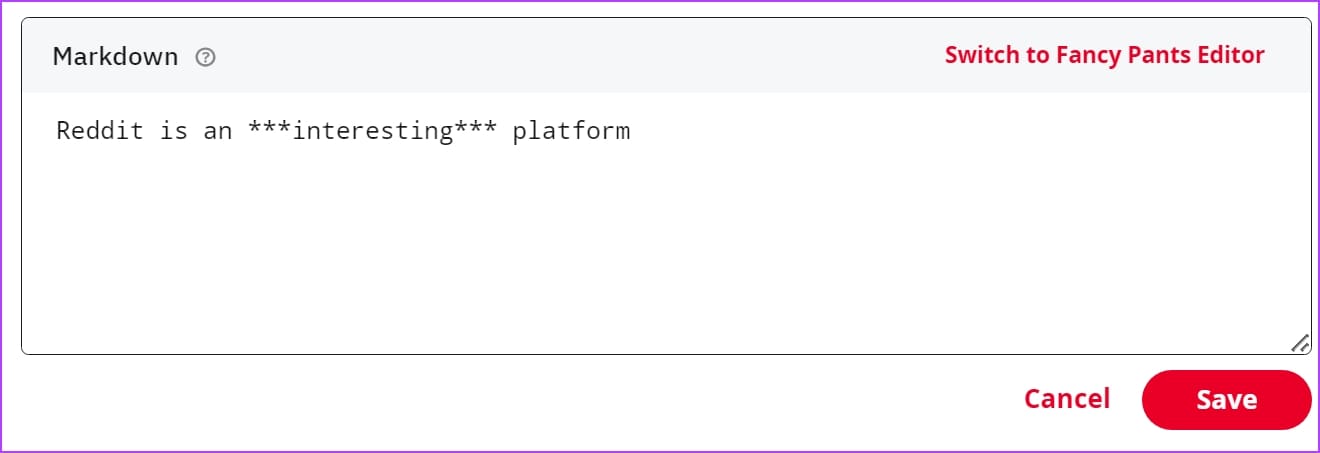
The word ‘interesting’ is made to be displayed in both bold and italics.

Strikethrough: Add three tilde (~) characters at either end of the word you want to strikethrough.

Here’s how we struck through the word ‘corrected’ in the example.

2. Superscripts
Here’s how you can add superscripts on Reddit. All you need to do is add the characters within a parenthesis and add the caret (^) character before opening the parenthesis.

Here’s how we added a superscript to my name, ‘Supreeth,’ in the example.

3. Sections and Headers
You can provide a better structure to your content on Reddit posts using headings. You get multiple levels of headings, and all you need to do is add the hash (#), followed by a space and then the heading text. To proceed to the descending heading, increase the count of the ‘#’ character.
Here’s how we added headings of four different levels.

And here’s how it looks when you publish the post.

4. Line Breaks
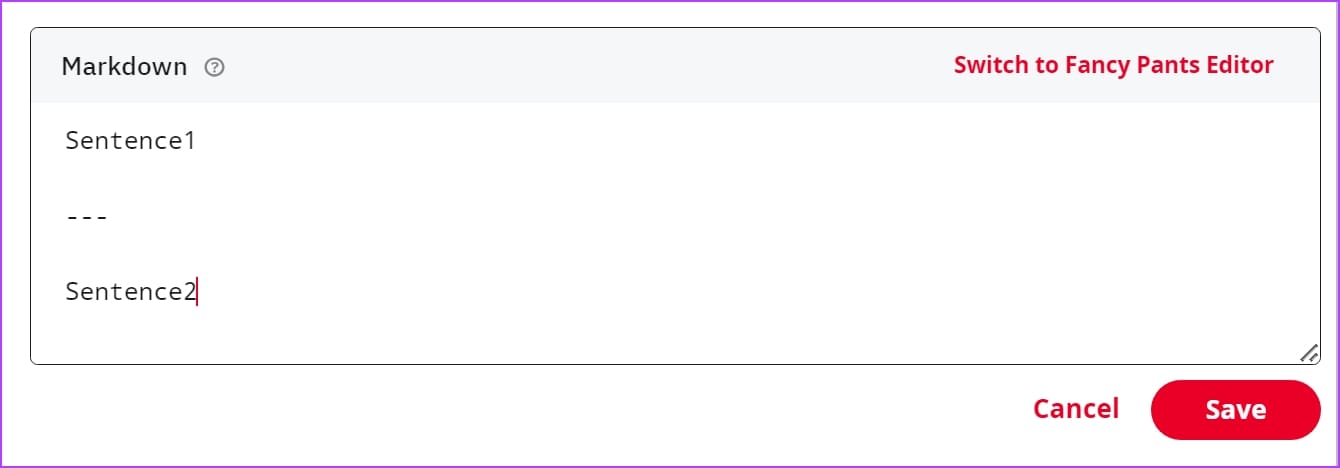
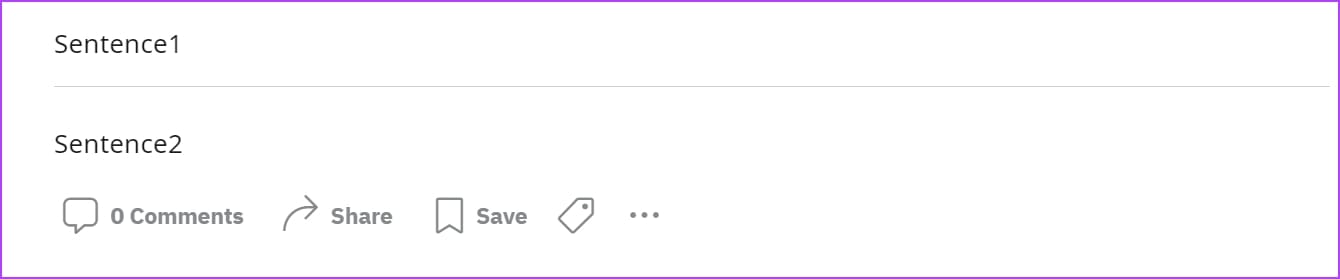
Line breaks can be used to indicate separation between two sentences. You can add a sentence, add two new empty lines, and add three or more hyphens (-) to add a line break. Here’s a quick example.
Here’s what a line break looks like when you publish a post.
5. Blockquotes
Blockquotes can help you offset a sentence from the surrounding content. To add a blockquote on Reddit, add the greater than (>) character before a syntax.

Here’s what a sentence looks like within a blockquote in a published post.

How to Use Markdown Mode to Add a Table on Reddit
Tables are a great way to convey information in the most efficient way possible through sorting and organizing data in rows and columns. Here’s how you can add a table in Reddit.
Columns are separated by the pipe ( | ), and the header row is separated by the hyphen (-). However, do note that you do not have to align all the characters while typing – the columns, rows, and headers will automatically align themselves. Further, entering just one hyphen below the header row will also do.
By default, data is aligned to the left. To right-align the data in a column, just add a period ( . ) before adding hyphens below the header row for that column. To center align the data, add a period ( . ) on both ends of the hyphens below the header row for that column.

Here’s what the output looks like.

How to Insert Links to Reddit Posts in Markdown Mode
If you are adding references to external sources within the content of your post on Reddit, URL links come in handy. However, adding a long URL within the text does no good for readability. Therefore, consider adding a hyperlink.
Add the link text within square brackets, and add the URL within parentheses.

Here’s what the output looks like for the example syntax in the above picture.

However, if you are adding an internal link for a subreddit or a user profile on Reddit, add the name of the subreddit after ‘r/’ and the username after ‘u/’.

Here’s how the links for a subreddit and a user will be presented in a published post.

How to Insert Code on Reddit in Markdown Mode
Content related to programming on Reddit forums has long helped computer science students and engineers. If you want to add code to your Reddit post, here’s how you can do it.
Insert an Inline Code
If you want to add a piece of code within a sentence, add them within single quotes. Take a look at the example below.

Here’s what an inline code looks like on a published post.

Insert Code Blocks on Reddit
If you want to insert an entire code block, add four spaces before each line of code. Take a look at the example below.

However, adding multiple spaces before each line of code can indeed get tedious. Therefore as an alternative, you can add three backtick characters ( ` ) between the lines of code.

Here’s how the code block will look on a published post.

How to Create Lists and Bullet Points on Reddit Using Markdown Mode
Lists are useful to add information in the form of points. Here’s how you can add a simple list. You need to add a hyphen (-) and a space character before you start the point.
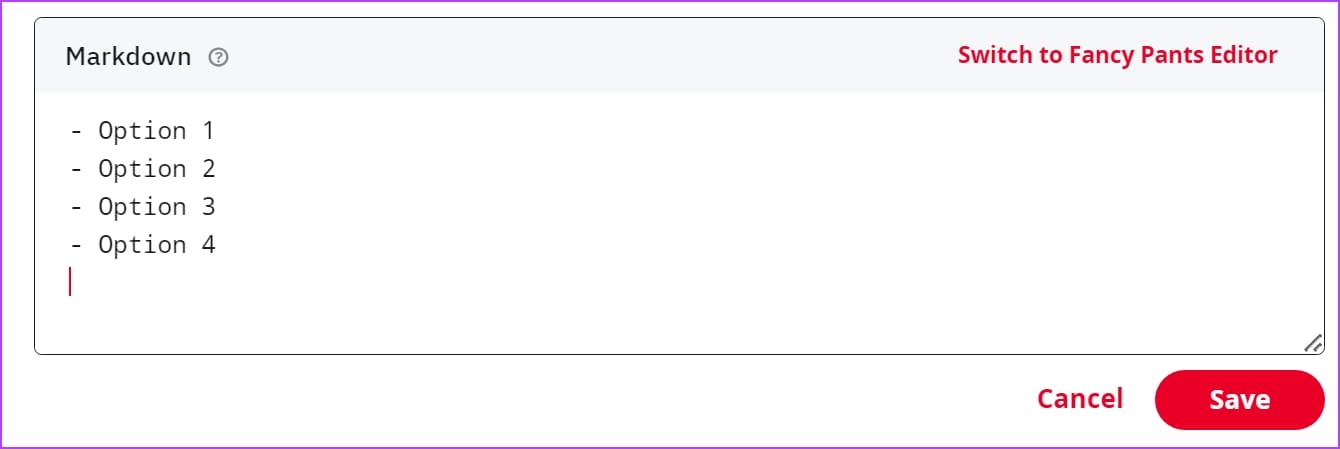
Here’s how the list will look like when you publish the post.

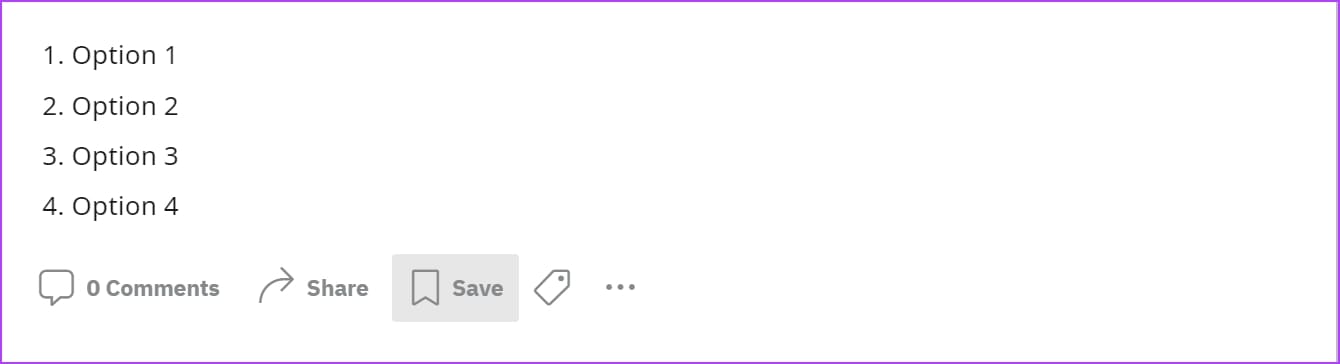
Alternatively, you can also add a numerical list.

Here’s what the output will look like.
If you want to add a nested list, you can simply add more indentation before the point begins. Take a look at the example below.
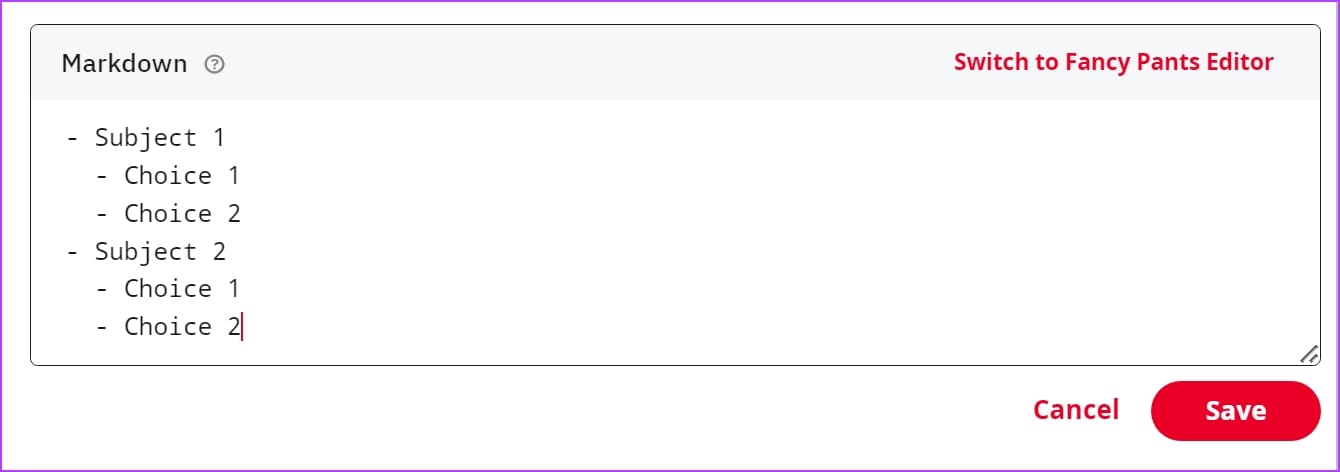
Here’s how a nested list looks when you publish the post.

How to Add Spoilers on Reddit Text
Reddit is also a platform where people often discuss and reflect on movies, shows, and books they consume. Therefore, it can also be difficult not to add spoilers to conversations, as you might ruin someone’s day.
However, there are a plethora of tools to classify text as spoilers on Reddit. You can check our article to learn how to add the spoiler tag.
Here’s what the spoiler text would look like in your post.

If you are viewing a spoiler, click on the colored text that says Reveal spoiler.

Once the color fades out, you can see the spoiler.

That is everything you need to know on how to use text formatting in Reddit using markdown mode. If you have any further questions, you can take a look at the FAQ section below.
FAQs on Text Formatting on Reddit
Yes. You can use markdown mode on Reddit mobile. However, there is no dedicated button to switch to markdown mode. Just type the syntax in the body of the post.
Yes. You can format comment text using the markdown mode syntax while typing it.
Yes. Markdown mode is available on old Reddit as well.
Format Text With Ease
We hope this text formatting guide for Reddit helps you post content in a well-structured and organized way. Reddit is a text-heavy platform, so tools like these will certainly come in handy to not only post your queries clearly but also to answer questions and help communities.
Was this helpful?
Last updated on 17 July, 2023
Read Next
 How To Turn Sublime Text 3 Into the Ultimate Markdown Editor
By now you must be familiar with what Markdown is and why so many web writers prefer it to other word processors.
How To Turn Sublime Text 3 Into the Ultimate Markdown Editor
By now you must be familiar with what Markdown is and why so many web writers prefer it to other word processors.
 What Are Markdown Writing Tools and Why Writers Need It
Time for a little history lesson.
What Are Markdown Writing Tools and Why Writers Need It
Time for a little history lesson.
 The Best Markdown Writing Apps For Mac – Guiding Tech
We’ve already told you about Markdown, a syntax that’s easy to write and read, and made for the web. If you are a web writer, Markdown can only make your life
The Best Markdown Writing Apps For Mac – Guiding Tech
We’ve already told you about Markdown, a syntax that’s easy to write and read, and made for the web. If you are a web writer, Markdown can only make your life
 The Best Markdown Writing Apps For Windows – Guiding Tech
Previously we’ve talked about how Markdown is a must-know language for anyone who writes for the web.
The Best Markdown Writing Apps For Windows – Guiding Tech
Previously we’ve talked about how Markdown is a must-know language for anyone who writes for the web.
 Ulysses for iPhone Review: Great Markdown Writing Tool
If you take a look at the App Store, you will see there is no shortage of writing apps in there, with some of them ranging from very good to
Ulysses for iPhone Review: Great Markdown Writing Tool
If you take a look at the App Store, you will see there is no shortage of writing apps in there, with some of them ranging from very good to
 4 Best Markdown Editors for Windows
In a world of WYSIWYG (what you see is what you get) editors like Microsoft Word, Google Docs, Evernote, Notion, etc., some users still prefer Markdown to jot down notes,
4 Best Markdown Editors for Windows
In a world of WYSIWYG (what you see is what you get) editors like Microsoft Word, Google Docs, Evernote, Notion, etc., some users still prefer Markdown to jot down notes,
 A Guide to Using Conditional Formatting in Google Sheets
Google Sheets' conditional formatting comes to the picture when you want to highlight a cell or row's data.
A Guide to Using Conditional Formatting in Google Sheets
Google Sheets' conditional formatting comes to the picture when you want to highlight a cell or row's data.
 How to Convert Google Slides to PowerPoint Without Losing Formatting
Google Slides is used by many professionals and students for creating and sharing slides.
How to Convert Google Slides to PowerPoint Without Losing Formatting
Google Slides is used by many professionals and students for creating and sharing slides.
The article above may contain affiliate links which help support Guiding Tech. The content remains unbiased and authentic and will never affect our editorial integrity.