The Kindle Scribe has a large notebook-like size and lets you scribble notes. Above all, it lends a good reading experience, especially if you love mangas and comics (Black & White). However, the fact that you can’t mark Kindle books or the lack of varied templates can be a limitation to some. Thankfully, the Kindle Scribe is not the only one in the market. And if you want one of the best Kindle Scribe alternatives, you have come to the right place.

In this post, we have lined up some of the best Kindle Scribe alternatives. These E-ink readers or e-notebooks let you read your favorite books and take notes.
So, without further ado, let’s check them out. But first,
- Here are the top-notch Amazon Kindle app alternatives
- Take a look at these budget tablets
- Have kids? Here are the coolest learning tablets for toddlers and kids
1. reMarkable 2
- Weight: 14.23 oz | Screen size: 10.3 inches | Storage: 8 GB internal storage
- Processor: 1.2 GHz dual-core ARM
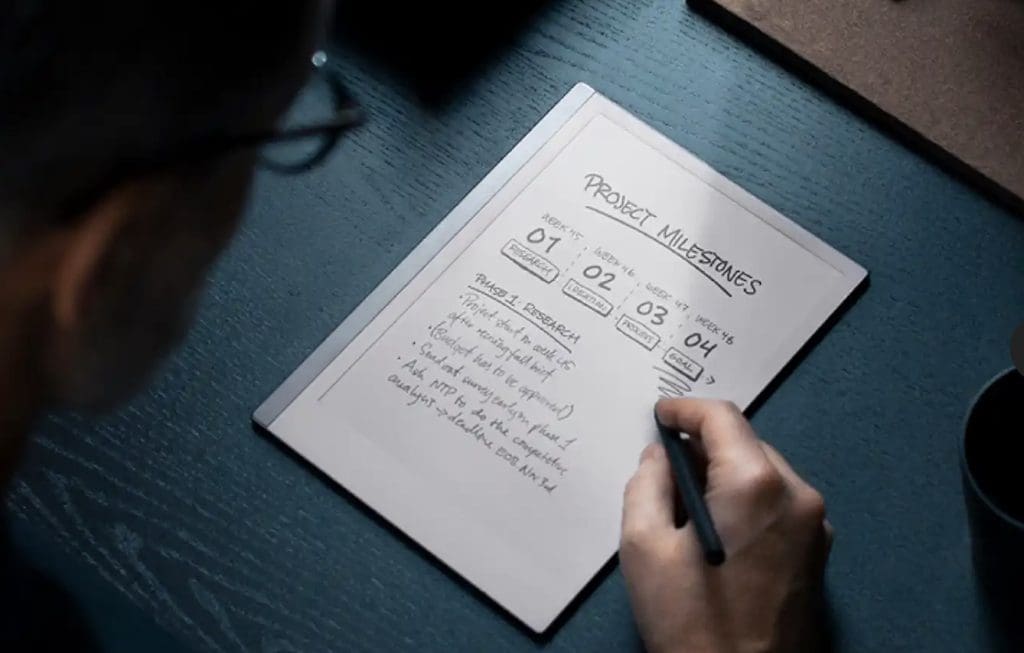
The first product on our list is the reMarkable 2 e-notebook. It’s affordable and is one of the cheaper alternatives. It’s designed to edit PDFs, take down notes, and so on. The screen texture is almost like the Kindle Scribe and will offer you an ‘almost’ paper feel. Moreover, you will be able to download your share of books as well. It supports ePub file formats.
The reMarkable 2 is priced pretty less compared to the Scribe. To that end, the resolution is a tad less at 226ppi. Nevertheless, you can jot down notes or read books seamlessly.
However, there are some limitations. For one, it doesn’t have dynamic lighting. As such, you will have to take the aid of external lights in low-light conditions.
The point where the reMarkable 2 excels is in the templates department. Since it’s aimed at note-taking folks, it has a slew of templates ranging from regular ruled books to music sheets. Plus, you can also connect your Google Drive and Dropbox accounts to back up your files. This way, you will be able to access your notes anywhere.
However, there’s a slight catch. The company doesn’t ship the stylus along with the tablet. You will either have to get the Marker or the Marker Plus stylus. And naturally, these will add to the price later on.
2. Kobo Elipsa 2E
- Weight: 13.8 oz | Screen size: 10.3 inches | Storage: 32 GB internal storage
- Processor: 2GHz dual core (no further details)…

A good alternative to the Kindle Scribe is Kobo’s Elipsa 2E. It’s comparatively new compared to the Scribe, yet it brings many features to the table. For one, it supports a slew of formats like EPUB3 and FlePub and document formats like TXT, RTF, and HTML, among others. Secondly, it offers a resolution of 227ppi and has a crisp and sharp screen. Further, the Kobo Elipsa 2E features a similar design.
While the screen resolution is a tad lower compared to the Scribe, the rapid refresh rate of the Elipsa makes it up for it. The folks at PC Mag opine that the screen refresh rate doesn’t let the writing feel laggy. It’s worth noting that the Elipsa bundles an E Ink Carta 1200 screen. And unlike its counterpart above, it has a backlight and you can tweak the brightness and color.
For cloud storage support, the Elipsa 2E supports Dropbox and Google Drive. Also, you will have to check its eBook store for the collection of books. And the odds are that you will find the books of your liking in the store.
Last but not least, the notebook is responsive, especially when taking notes, sketching, or doing a calligraphy exercise.
3. BOOX Note Air2 Plus
- Weight: 15.69 oz | Screen size: 10.3 inches | Storage: 64 GB + 5 GB cloud storage
- Processor: Advanced octa-core processor

Another cool Kindle Scribe alternative is the Boox Note Air2. The highlight of this e-notebook is its premium design and lightweight body. It has a solid build which also adds to its durability. Again, it features a 10.3-inch E Ink Carta HD display. However, the display resolution is a touch less compared to the Scribe. That said, the 227ppi screen is crisp and sharp.
The BOOX Note Air2 Plus does the dual duty of letting you read your favorite book and annotating on top of them. You can also use browsers like Chrome to check messages and emails or download some of your favorite books. As the folks at Android Central put it, it’s a serious productivity device and is apt for taking notes.
It comes with the usual bells and whistles like dynamic lighting to adjust the brightness as per the ambient lights. It also bundles a feature named MOON Light 2 backlight, which lets you switch between warm and cold color tones.
It’s a good Kindle Scribe alternative. However, you will have to be content with downloading or getting access to the digital versions of books and novels, which is seamless for Kindle readers. Plus, the battery life is a tad on the lower side, and you will need to charge it weekly. For the record, the battery on the Kindle Scribe lasts up to 4 weeks minimum.
4. Ratta Supernote A5X
- Weight: 13.22 oz | Screen size: 10.3 inches | Storage: 32 GB storage
- Processor: PX30 Quad-core Cortex-A35

If you are looking for a note-taking device primarily for sketching and writing, then the Ratta Supernote A5X is one you need to check out. It has an E INK Möbius touchscreen display, with a tad less resolution. For now, it has a resolution of 226ppi and supports formats like PDF, EPUB, DOC & DOCX, CBZ, FB2, XPS, PNG, JPG, etc. The software inside the note-taking tablet works brilliantly and has received its share of appreciation from authoritative reviewers.
Before we get going, it’s worth pointing out that the Supernote A5X is expensive, and the price is almost at par with the Kindle Scribe. That said, it boasts a truckload of advanced features. Unlike the Scribe, you can have different pages in a notebook. Plus, you can link to other notebooks inside the Supernote A5X or create and edit your document in the built-in word processor. You can also tag your handwriting with a keyword. And when needed, you can search your handwriting.
Again, the Supernote A5X is more for creating notes for writing on top of other PDF files. It doesn’t have a store of its own, and you may need to do some research before loading books and comic books. It’s worth noting that you can manually sync your documents to Dropbox and the in-house Supernote cloud.
One of the major limitations of this E-Ink display is its stylus/pen. While it’s comfortable to hold & write, it doesn’t have a magnetic body. If you’re not careful, you can lose the stylus.
Take Note!
These were some of the alternatives to the Kindle Scribe. Apart from the one above, you can also check out the specs for Lenovo’s Smart Paper which will release by the end of 2023.
It’s worth noting that while the e-notebooks above let you experiment with different templates and writing styles, they won’t have access to premium Amazon services like Audible. And the lack of a proper store means you will have to dig around to find the digital versions of your books, comics, and novels.
Will you invest in a Kindle Scribe or opt for one of the alternatives?
Was this helpful?
Last updated on 17 May, 2023
Read Next
 How to Take a Screenshot on Kindle, Kindle Paperwhite, and Kindle Oasis
The Kindle has to be one of our favorite purchases.
How to Take a Screenshot on Kindle, Kindle Paperwhite, and Kindle Oasis
The Kindle has to be one of our favorite purchases.
 Kindle vs. Kindle Paperwhite: Which Kindle Should You Buy
So, you recently discovered that using a Kindle is sustainable and efficient.
Kindle vs. Kindle Paperwhite: Which Kindle Should You Buy
So, you recently discovered that using a Kindle is sustainable and efficient.
 6 Best Amazon Kindle Scribe Covers and Cases
The Amazon Kindle Scribe is one of the largest eReaders from the house of Amazon, and boy does it pack a punch!
6 Best Amazon Kindle Scribe Covers and Cases
The Amazon Kindle Scribe is one of the largest eReaders from the house of Amazon, and boy does it pack a punch!
 5 Best Kindle Scribe Screen Protectors
The Kindle Scribe is a unique device.
5 Best Kindle Scribe Screen Protectors
The Kindle Scribe is a unique device.
 How to Change Font Style in Notes App on iPhone, iPad and Mac
The Notes app can be your go-to digital resource for taking down everything important and should be remembered and noticed.
How to Change Font Style in Notes App on iPhone, iPad and Mac
The Notes app can be your go-to digital resource for taking down everything important and should be remembered and noticed.
 6 Best Amazon Kindle App Alternatives
Over the years, eReaders and eBooks have redefined how we read books.
6 Best Amazon Kindle App Alternatives
Over the years, eReaders and eBooks have redefined how we read books.
 4 Budget Bluetooth Speakers with Good Sound & Style
Smartphones often don’t cut it when we want great sound.
4 Budget Bluetooth Speakers with Good Sound & Style
Smartphones often don’t cut it when we want great sound.
 How to Get Google Pixel 2 Launcher Style on Your Android
When the LG G6 was launched, its features created quite a buzz.
How to Get Google Pixel 2 Launcher Style on Your Android
When the LG G6 was launched, its features created quite a buzz.
The article above may contain affiliate links which help support Guiding Tech. The content remains unbiased and authentic and will never affect our editorial integrity.